The Framework Is Not the Whole Story
By Angel P. | July 7, 2026
How I used to think about performance
At first, I used to look at performance mostly through the framework.
In Angular, that usually meant checking change detection, subscriptions, track functions, template complexity, or whether some component was updating too often. And those things matter. I still check them.
But as I moved deeper into frontend development, especially while working on heavier components and shared UI that gets reused in many places, I started seeing performance differently. The framework was only one layer of the story. Underneath it, the browser was doing the real rendering work.
The framework is not the whole story.
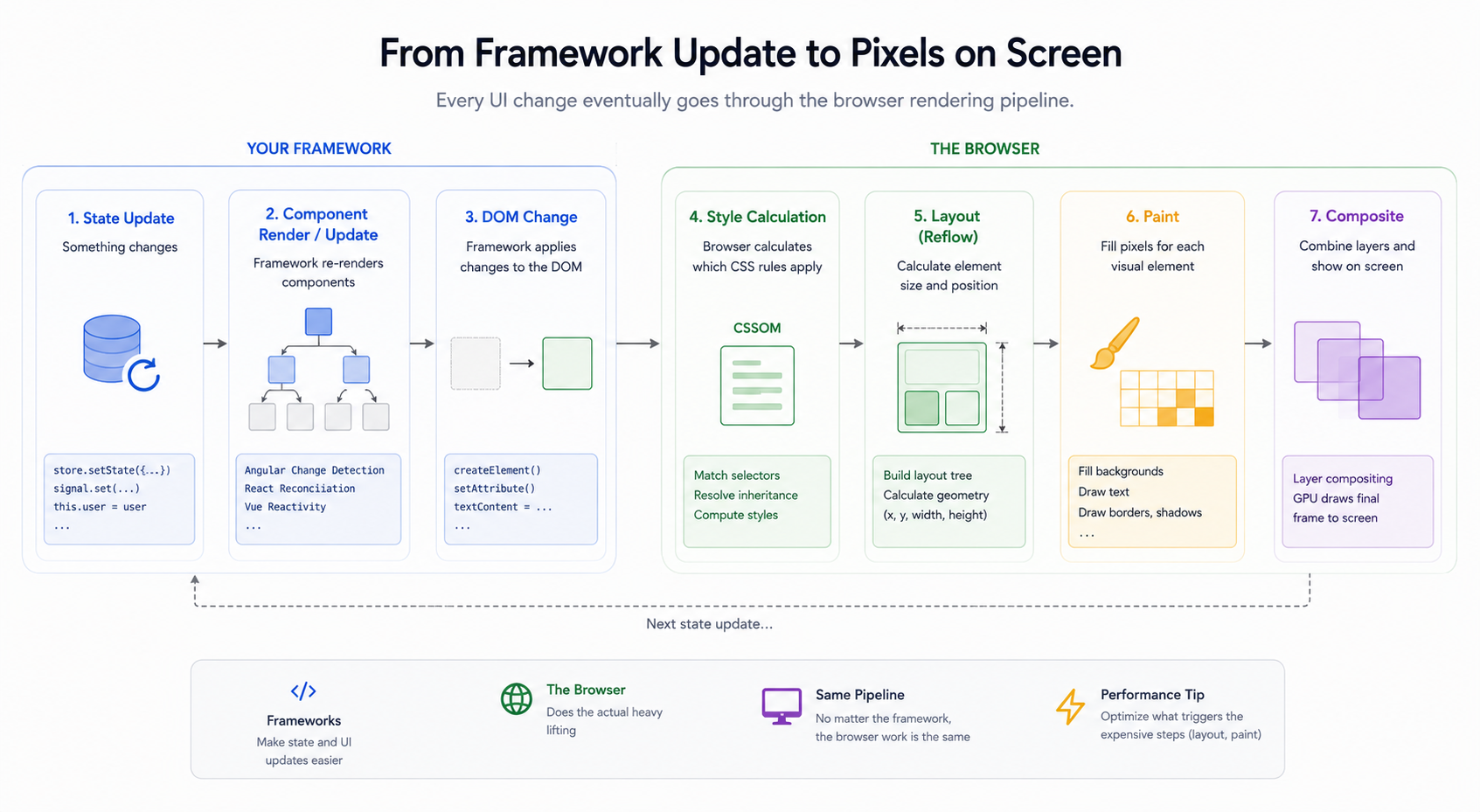
Angular, React, Vue, Svelte, or plain JavaScript all eventually end up in the same place: the browser. That sounds obvious, but it is easy to forget when most of the day is spent inside components, templates, state, and framework APIs.
A framework can help us organize code, manage state, split responsibilities, and update the UI in a more predictable way. I like that part of frontend a lot. But the framework does not pay the rendering bill for us. The browser still has to do the work.
What changed when I went deeper into frontend
The biggest change was that I stopped treating the browser as a hidden implementation detail. When a component is reused across a product, small rendering decisions matter more. A bad default can spread everywhere. A good default can quietly make many screens easier to use.
That is especially true in component libraries. The component may look simple from the outside, but the browser still pays for DOM size, layout work, paint cost, and main-thread JavaScript.
The browser rendering pipeline
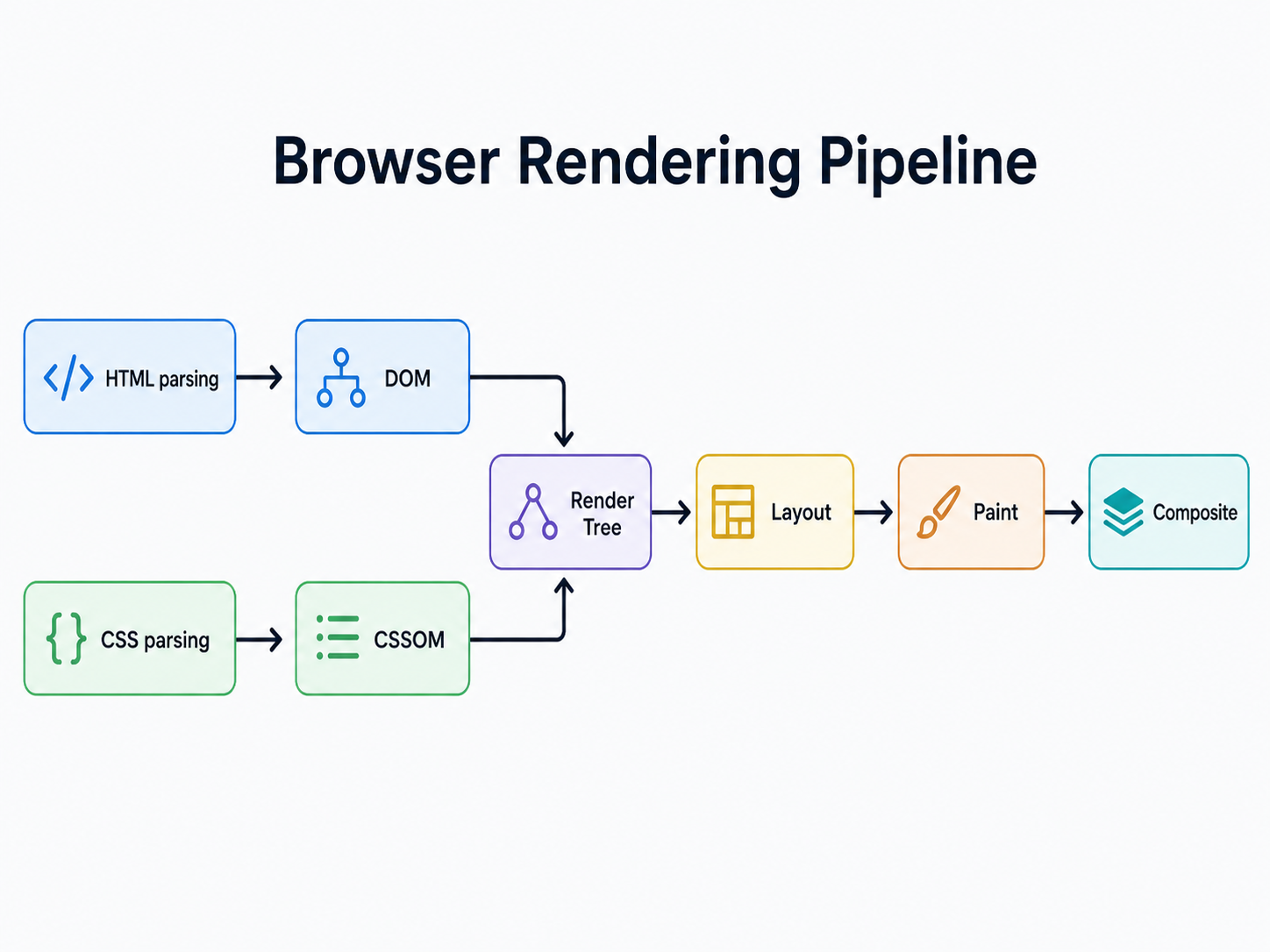
When the browser receives a page, it starts by parsing HTML and CSS. The HTML becomes the DOM, which represents the structure of the document. The CSS becomes the CSSOM, which represents the styling rules.
HTML -> DOM
CSS -> CSSOM
DOM + CSSOM -> Render Tree
Layout -> Paint -> Composite
The DOM and CSSOM are then combined into the render tree. The render tree contains the visible elements and the styles needed to draw them. After that, the browser performs layout, where it calculates the size and position of elements.
Once layout is done, the browser can paint. Painting means filling in pixels: text, colors, borders, shadows, images, backgrounds. After painting, the browser may split parts of the page into layers and composite them together on the screen.
This is the part that changed how I look at frontend performance. Every UI decision eventually touches some part of this pipeline. Sometimes the framework code is fine, but the screen still feels slow because the real cost is lower in the browser.
JavaScript and the main thread
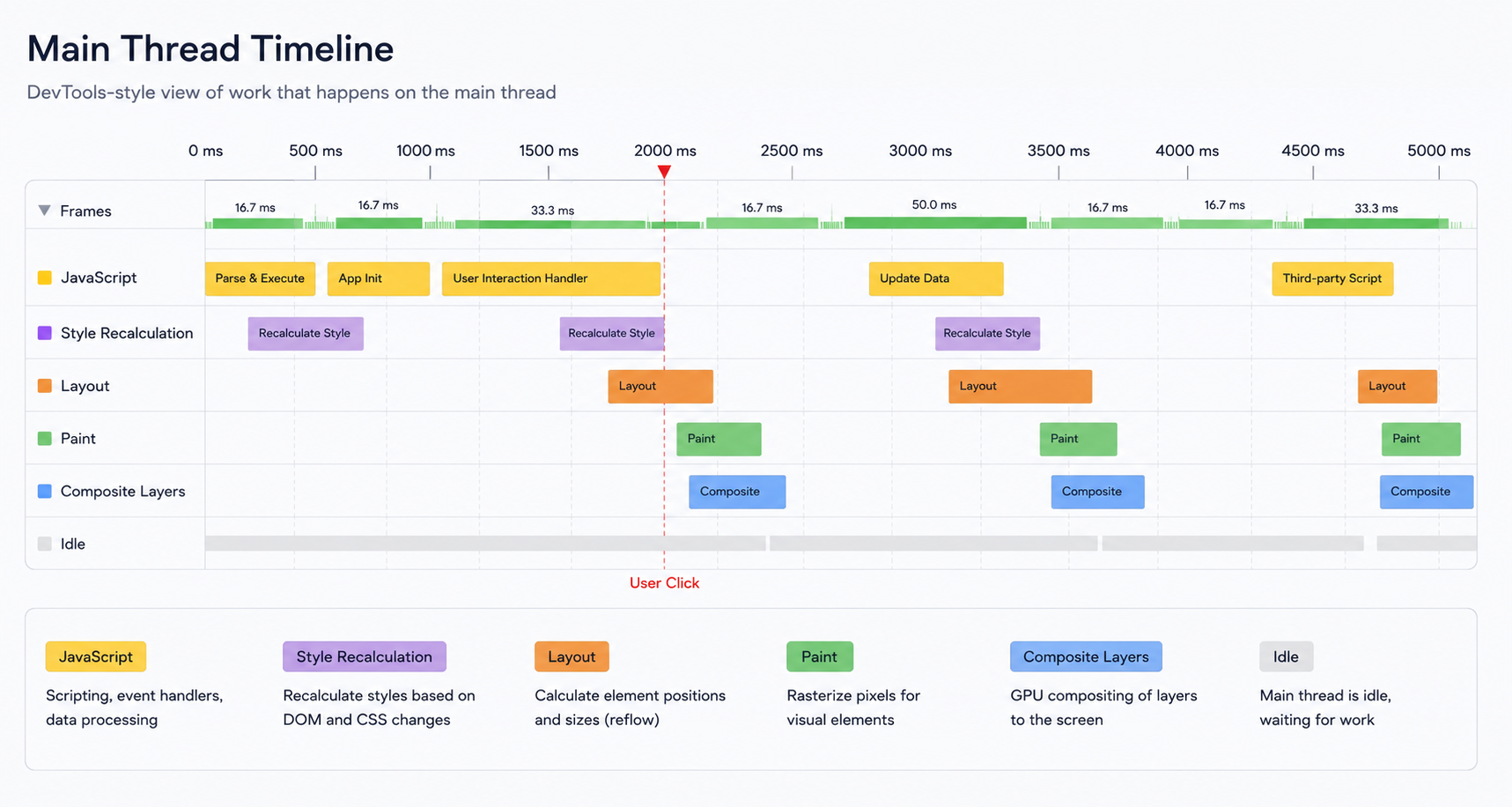
Most of our frontend code runs on the browser's main thread. That same main thread is also responsible for style calculation, layout, paint, input handling, and a lot of the work needed to keep the page responsive.
This means JavaScript is not free. If we run expensive code for too long, the browser has less time to render the next frame or respond to user input. I have seen screens that did not look visually complicated, but still felt heavy because the main thread was simply busy.
A framework update is also JavaScript work. Angular change detection, React reconciliation, Vue updates, or any manual DOM code all need CPU time. The framework may optimize how updates are calculated, but after the update is decided, the browser still needs to apply DOM changes and render the result.
Layout, paint, and composite do not cost the same
This is where I see people stop too early. They optimize a subscription or a render path, but then animate the wrong property, create layout shifts, or add a component that forces more browser work than expected.
Not every visual change has the same cost. Changing text content, inserting DOM nodes, or changing layout properties can force the browser to recalculate where things belong. This is layout work.
Layout can be expensive because one change may affect many other elements. If a component changes size, the browser may need to recalculate surrounding elements too. This is one reason layout shifts feel bad: they affect both performance and user experience.
Paint is different. Paint is about drawing pixels. Some styles are more expensive to paint than others: complex shadows, filters, large backgrounds, heavy gradients, or big areas that repaint often.
Composite is often cheaper because the browser can move already-painted layers around. This is why properties like transform and opacity are usually better choices for animations than changing layout properties like width, height, top, or left.
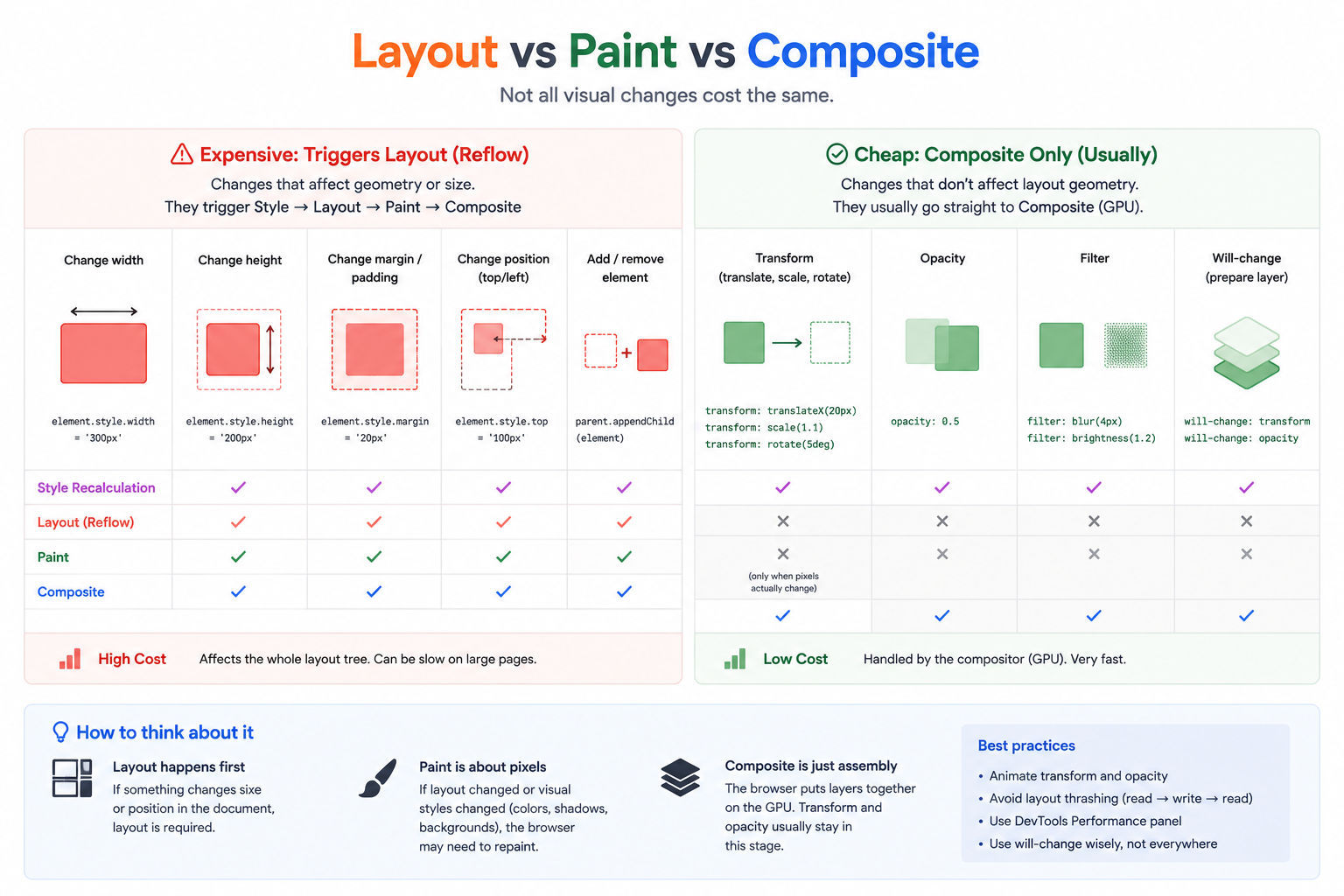
Example: layout work vs composite work
A simple way I think about performance is to ask: which stages of the rendering pipeline does this change force the browser to run?
For example, changing layout properties like width, height, top, or left can force layout. After layout, the browser may also need to paint and composite.
// More expensive: can trigger layout, paint, and composite
const panel = document.querySelector('.panel');

panel.style.width = '420px';
panel.style.left = '24px';

// Browser may need to run:
// style -> layout -> paint -> composite
If the goal is only to move something visually, using transform usually gives the browser a cheaper path. The element can often be moved during compositing without recalculating the layout of the page.
// Usually cheaper: can stay mostly in the composite stage
const panel = document.querySelector('.panel');

panel.style.transform = 'translateX(24px)';

// Browser may only need:
// style -> composite
It is not magic, and the browser can still make different decisions depending on the element, styles, and page structure. But this mental model helps. When I am building something that moves, expands, collapses, or appears often, I try to avoid making the browser recalculate layout unless I really need it.
Example: reading layout at the wrong time
There is another common performance trap: mixing DOM writes and layout reads. When we change styles and then immediately ask the browser for layout information, the browser may be forced to calculate layout right away so it can return the correct value.
const card = document.querySelector('.card');

// Write: invalidates layout
card.style.width = '480px';

// Read: forces the browser to calculate layout now
const rect = card.getBoundingClientRect();

console.log(rect.width);

// This pattern can force:
// style -> layout
// and if followed by more visual changes:
// paint -> composite
This is why repeated layout reads inside loops, scroll handlers, resize handlers, or animation code can hurt. The browser loses the chance to batch work efficiently. It is also the kind of issue that can hide inside a reusable component and become painful only after that component is used everywhere.
What this means when writing frontend code
When I build components, especially shared components, I try to think about the browser cost, not only the code shape. A component can have a clean API and still create performance problems if it renders too much, updates too often, or creates layout work every time the user interacts with it.
Some questions I like to ask:
- How much DOM does this component create?
- How often does it update?
- Does one small state change re-render a large part of the screen?
- Does this interaction trigger layout, paint, or only compositing?
- What happens when this component is repeated 100 or 500 times?
- Is the expensive work happening during typing, scrolling, resizing, or animation?
These questions become even more important in component libraries and design systems. A component library is not just a collection of pretty UI elements. It is shared infrastructure. If one component has a bad default, that decision can quietly spread across the product. If one component is built well, it can save work and make many screens feel better.
Framework performance still matters
This does not mean frameworks are irrelevant. Framework-level performance matters a lot. In Angular, I still care about change detection boundaries, signals, RxJS subscriptions, template complexity, track functions in loops, lazy loading, and how state changes move through the UI.
But framework performance and browser performance are connected. If Angular updates a component, that update can lead to DOM changes. DOM changes can lead to style recalculation, layout, paint, or composite work. If we only look at the framework, we may miss the real cost.
This is why DevTools matters. Performance traces, layout shift information, paint flashing, memory snapshots, and the main-thread flame chart can show what is actually happening. Sometimes the bug is not where I first expect it. Sometimes Angular is doing what I asked it to do, but what I asked for is still expensive in the browser.
A practical checklist before blaming the framework
Before I assume the framework is the problem, these are the things I try to check:
- Is the main thread busy with JavaScript work?
- Is the screen creating too much DOM?
- Are we triggering layout repeatedly?
- Are layout reads and writes mixed together?
- Are expensive paints happening too often?
- Are animations using layout properties instead of transform or opacity?
- Does the problem only appear when a component is repeated many times?
- Can DevTools confirm whether the cost is JavaScript, layout, paint, or compositing?
The final takeaway
Understanding the rendering pipeline helps no matter what framework you use. It gives you a better mental model for debugging performance issues, reading browser DevTools, and making smarter UI decisions before a problem becomes visible to users. It also makes frontend feel less like guessing.
It also makes you more adaptable. If tomorrow you move from Angular to React, Vue, Svelte, or something new, the browser is still there. The DOM is still there. Layout and paint are still there. The main thread is still there.
I still love working with Angular. I care about Angular architecture, Nx workspaces, component APIs, state, forms, and all the patterns that help teams build product faster.
But the deeper I go into frontend, the more I respect the platform underneath it. The browser is not an implementation detail we can ignore. It is where our abstractions become real, and sometimes where our clean code becomes expensive.
For me, frontend is not only about knowing a framework. It is about understanding the platform your framework runs on.
Writing note: The ideas and examples in this post come from my own frontend work. I used AI to help structure and edit the article.